Where the time goes on the floor
Walk a production line for one shift and the same delays keep showing up:
- Searching for answers: operators flip through binders, shared drives and old emails for a torque value, a changeover step or a fault code.
- Waiting for the expert: when an answer is not written down where people can find it, everyone waits for the senior technician.
- Shift handovers: what happened on the last shift lives in a notebook or in someone’s head.
- Machine data nobody reads: sensors log everything, but no one has time to watch the readings until something stops.
- Training new operators: every new starter asks the same questions in their first months.
Most of the answers already exist in your manuals, SOPs, work instructions and machine data. The problem is getting them to the right person at the moment they are needed.
Two kinds of AI agent that help
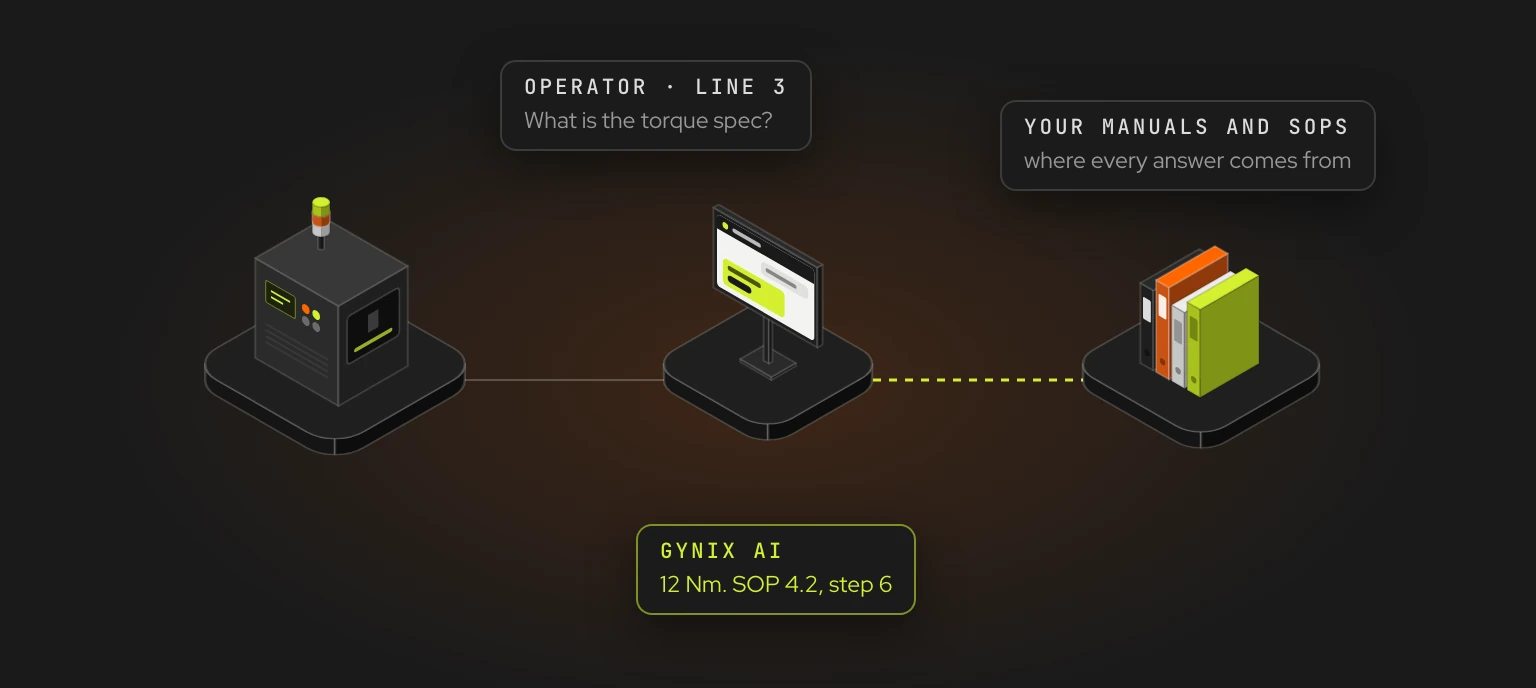
Operator assistants answer questions in plain language from your own manuals and SOPs. An operator asks “What is the torque spec for line 3?” at the line and gets the value straight away, instead of starting a search. A good assistant also shows where the answer came from, so the operator can check it.
Agents on machine and sensor data watch the readings you already collect and turn them into decisions your team can act on, such as flagging a drift before it becomes a stoppage, or raising a work order with the readings attached. A board inspection (QA) agent is one example of a workflow built this way.
What to keep for people
AI agents should support decisions on the floor, not take the ones that carry risk. Keep these with people:
- Safety-critical decisions, such as overriding an interlock or restarting after an incident.
- Quality sign-offs, and anything a customer or an auditor holds you to.
- Changes to the process itself. The agent answers from your SOPs; your engineers decide what the SOPs say.
How to start
- Pick one line and one kind of question, such as changeovers, fault codes or quality checks. A narrow start shows results quickly and is easy to check.
- Gather the documents behind the answers: manuals, SOPs, work instructions and maintenance logs. Retire out-of-date versions first, because an agent is only as current as its documents.
- Decide where it runs. If machine data, drawings or SOPs must stay inside the plant, run the agent on your own servers rather than in a public cloud.
- Connect the systems it needs, such as your ERP, maintenance system or machine data, so answers reflect what is happening now.
- Build and test it with your engineers. Ask the questions operators really ask, in the words they use, and check every answer against its source.
- Pilot with one shift. Collect the questions it could not answer and add the missing documents.
- Review every week, then expand to the next line or the next kind of question.
What to measure
- Time to an answer: how long an operator waits for the information they need.
- Calls to senior technicians: how often work stops to wait for an expert.
- Unanswered questions: what operators asked that your documents did not cover. This list is also a map of the gaps in your SOPs.
- Downtime per stoppage on the lines where agents run.
- Time to train new operators.
Mistakes to avoid
- Using a general chatbot that has never seen your manuals, so answers sound right but are wrong for your equipment.
- Loading every document at once, old versions included, so the agent quotes a procedure you retired.
- Skipping the security review. Decide early which data can leave the plant and which cannot.
- No owner for the content. Someone has to keep the SOPs current, or the agent drifts out of date.
Where SunTech Software fits
Gynix AI is our platform for building and running AI agents in manufacturing. Its visual builder lets your engineers assemble and adjust agents, it answers from your machine data, manuals and SOPs, and it can run on your own servers when data has to stay inside the plant. We connect it to your ERP, machine systems and internal data, and deliver it end to end from Penang, Malaysia: discovery, build and training, integration, go-live and support. See AI agents for manufacturing, or use the form below to book a demo.
Common questions
What is an AI operator assistant?
An AI agent that answers operators' questions in plain language from your own manuals, SOPs and work instructions, at the line, so nobody has to search binders or wait for a senior technician.
Can AI agents run on-premise in a factory?
Yes. Gynix AI is self-hostable, so it can run on your own servers or private infrastructure and keep machine data, manuals and SOPs inside your network.
Where should a manufacturer start with AI agents?
With one production line and one kind of question, such as changeovers, fault codes or quality checks, using the documents behind the answers. Pilot with one shift, review every week, then expand.
How do you keep an AI agent's answers up to date?
Give someone ownership of the SOPs and retire old versions, because the agent answers from the documents it is given. Review the questions it could not answer every week and add what is missing.